MT4GOLD/XAUUSDM15Low DrawdownParameter Overview
Research Brief
A structured MT4 product profile with visual report, backtest metrics, strategy classification, input-parameter notes, and licensed package delivery.
Snapshot
Product
Albatross ver4 EA
Test Period
2026.01.01 to 2026.06.01
Visual Report
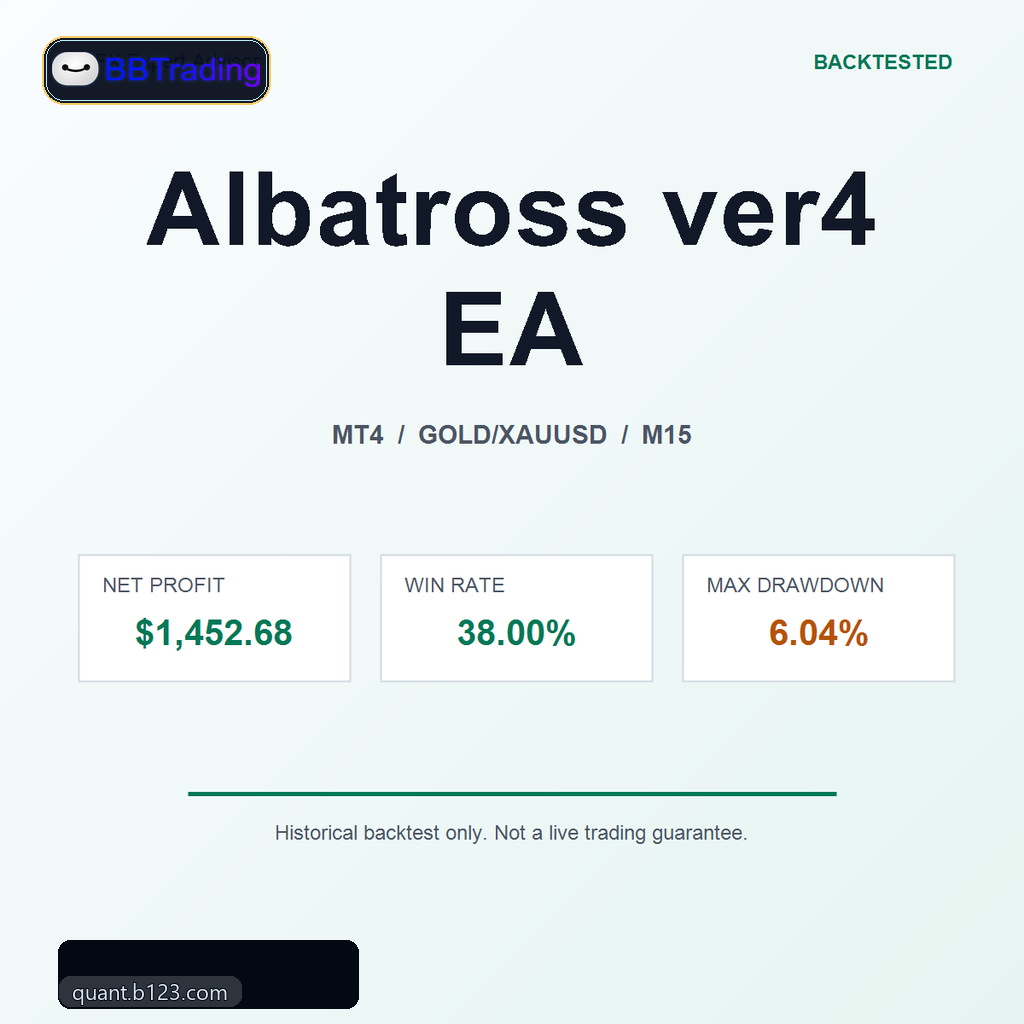
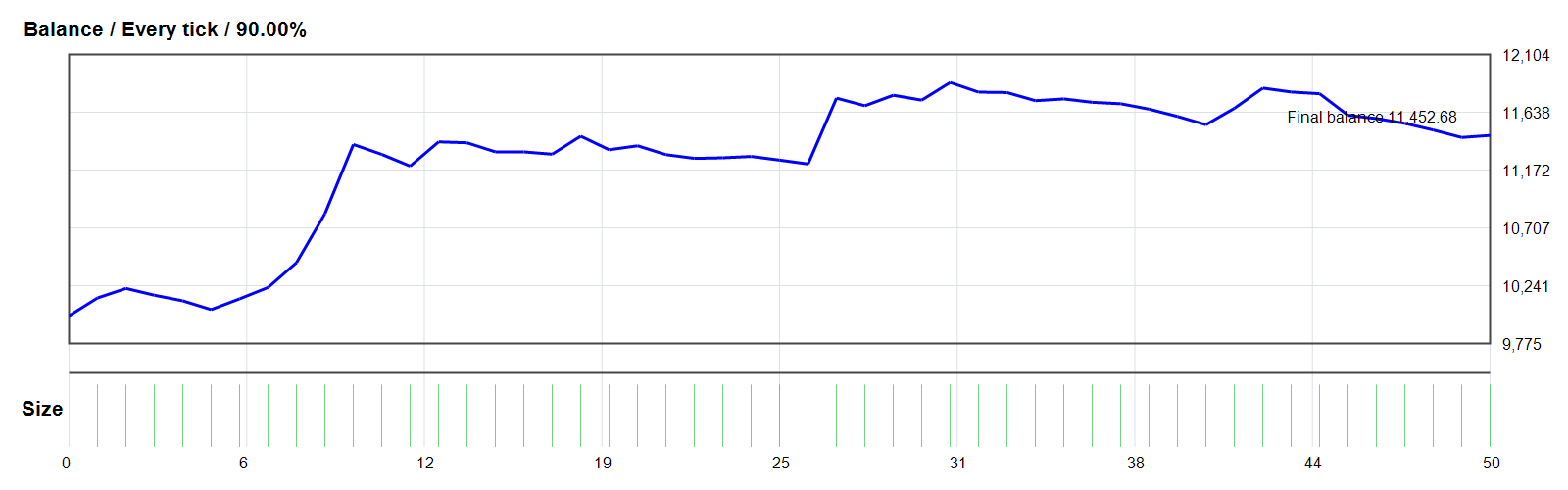
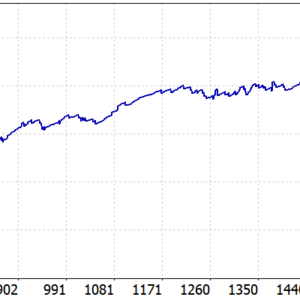
Backtest visuals are placed near the top so buyers can inspect the equity curve and report screenshots before reading the full metrics table.
Backtest Metrics
| Metric |
Value |
| Platform |
MT4 |
| Symbol |
GOLD/XAUUSD |
| Timeframe |
M15 |
| Test Period |
2026.01.01 to 2026.06.01 |
| Initial Deposit |
$10,000.00 |
| Net Profit |
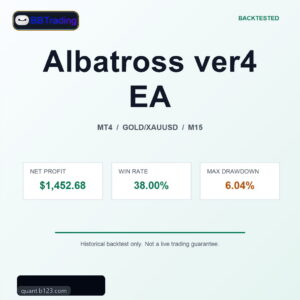
$1,452.68 |
| Return |
14.53% |
| Max Drawdown |
6.04% |
| Win Rate |
38.00% |
| Total Trades |
50 |
| Profit Factor |
1.93 |
| Risk Profile |
Low Drawdown |
MT4 Report Details
| Metric |
Value |
| Model |
Every tick (the most precise method based on all available least timeframes) |
| Modelling Quality |
90.00% |
| Spread |
50 |
| Gross Profit |
3020.40 |
| Gross Loss |
-1567.72 |
| Expected Payoff |
29.05 |
First Trade Records
The table shows the first available closed or balance-impacting records from the MT4 report. It is a compact execution sample, not a live-trading promise.
| Time |
Type |
Order |
Size |
Price |
Profit |
Balance |
| 2026.01.12 11:59 |
s/l |
1 |
0.01 |
4588.22 |
143.39 |
10143.39 |
| 2026.01.12 11:59 |
s/l |
2 |
0.01 |
4588.22 |
76.12 |
10219.51 |
| 2026.01.14 16:00 |
close |
3 |
0.01 |
4636.26 |
-54.60 |
10164.91 |
| 2026.01.16 09:00 |
close |
4 |
0.01 |
4598.03 |
-45.17 |
10119.74 |
| 2026.01.19 04:00 |
close |
5 |
0.01 |
4657.76 |
-70.57 |
10049.17 |
| 2026.01.20 22:23 |
s/l |
6 |
0.01 |
4750.08 |
86.87 |
10136.04 |
| 2026.01.21 08:46 |
s/l |
7 |
0.01 |
4857.86 |
91.32 |
10227.36 |
| 2026.01.26 15:00 |
s/l |
8 |
0.01 |
5076.70 |
200.39 |
10427.75 |
| 2026.01.29 17:00 |
close |
9 |
0.01 |
5497.30 |
394.68 |
10822.43 |
| 2026.01.30 19:07 |
t/p |
10 |
0.01 |
4929.96 |
557.02 |
11379.45 |
| 2026.02.05 17:00 |
close |
11 |
0.01 |
4846.08 |
-79.76 |
11299.69 |
| 2026.02.06 09:00 |
close |
12 |
0.01 |
4846.97 |
-94.51 |
11205.18 |
| 2026.02.09 23:28 |
s/l |
13 |
0.01 |
5053.49 |
195.41 |
11400.59 |
| 2026.02.12 09:00 |
close |
14 |
0.01 |
5059.68 |
-7.58 |
11393.01 |
| 2026.02.13 07:00 |
close |
15 |
0.01 |
4977.20 |
-73.06 |
11319.95 |
| 2026.02.16 19:00 |
close |
16 |
0.01 |
4988.09 |
-0.22 |
11319.73 |
| 2026.02.20 05:00 |
close |
17 |
0.01 |
4996.67 |
-18.14 |
11301.59 |
| 2026.02.23 05:12 |
s/l |
18 |
0.01 |
5152.56 |
144.78 |
11446.37 |
| 2026.02.27 23:00 |
close |
19 |
0.01 |
5263.81 |
-109.39 |
11336.98 |
| 2026.03.02 20:00 |
close |
20 |
0.01 |
5306.86 |
31.94 |
11368.92 |
Strategy and Risk Notes
Albatross ver4 EA is classified from the parsed report and settings as: Parameter Overview.
The classification is used for catalog filtering and research screening; it should be confirmed in MT4 before production trading.
The main risk signal is the 6.04% maximum drawdown, classified here as Low Drawdown. Review trade count, drawdown shape, spread sensitivity, broker execution, and parameter stability before deciding whether this Expert Advisor deserves forward testing.
Input Parameters
Showing 35 key parsed inputs from 35 detected settings for quick setup reference.
Parameter
ModificationPips
Meaning
Enables or disables the corresponding EA module.
Setup Note
Changing a module switch can materially alter entries, exits, filtering, or protection logic.
Meaning
Author-defined strategy input exposed by the EA package.
Setup Note
Use this setting together with the other inputs shown in the table.
Parameter
MoneyManagementOn
Meaning
Enables or disables the corresponding EA module.
Setup Note
Changing a module switch can materially alter entries, exits, filtering, or protection logic.
Parameter
PipsNormalModificationRisk
Meaning
Controls account-risk based sizing or an internal risk level.
Setup Note
A higher risk value can increase exposure, margin use, and peak-to-valley drawdown.
Parameter
MoneyManagement
Meaning
Author-defined strategy input exposed by the EA package.
Setup Note
Use this setting together with the other inputs shown in the table.
Meaning
Author-defined strategy input exposed by the EA package.
Setup Note
Use this setting together with the other inputs shown in the table.
Meaning
Controls grid spacing, averaging distance, or distance-based order placement.
Setup Note
Smaller spacing can increase order density and drawdown during one-sided trends.
Meaning
Controls trade volume or the base position size used by the EA.
Setup Note
Higher lot size increases profit potential and drawdown pressure at the same time.
Parameter
SeriesCatchingUp
Meaning
Author-defined strategy input exposed by the EA package.
Setup Note
Use this setting together with the other inputs shown in the table.
Meaning
Author-defined strategy input exposed by the EA package.
Setup Note
Use this setting together with the other inputs shown in the table.
Meaning
Author-defined strategy input exposed by the EA package.
Setup Note
Use this setting together with the other inputs shown in the table.
Meaning
Author-defined strategy input exposed by the EA package.
Setup Note
Use this setting together with the other inputs shown in the table.
Parameter
LengthDECVIATION
Meaning
Author-defined strategy input exposed by the EA package.
Setup Note
Use this setting together with the other inputs shown in the table.
Meaning
Author-defined strategy input exposed by the EA package.
Setup Note
Use this setting together with the other inputs shown in the table.
Meaning
Author-defined strategy input exposed by the EA package.
Setup Note
Use this setting together with the other inputs shown in the table.
Meaning
Author-defined strategy input exposed by the EA package.
Setup Note
Use this setting together with the other inputs shown in the table.
Meaning
Sets the take-profit target for single trades, baskets, or the account-level target.
Setup Note
Larger targets can extend holding time and expose positions to deeper pullbacks.
Meaning
Sets stop-loss, emergency loss control, or equity protection behavior.
Setup Note
Wider loss limits can reduce stop-outs but increase the loss size when protection triggers.
Parameter
TrailingPendingOn
Meaning
Controls trailing stop or breakeven protection after a position moves into profit.
Setup Note
Tighter protection locks gains earlier but may exit normal pullbacks too soon.
Parameter
TrailingPendingStart
Meaning
Controls trailing stop or breakeven protection after a position moves into profit.
Setup Note
Tighter protection locks gains earlier but may exit normal pullbacks too soon.
Parameter
TrailingUnitaryOn
Meaning
Controls trailing stop or breakeven protection after a position moves into profit.
Setup Note
Tighter protection locks gains earlier but may exit normal pullbacks too soon.
Parameter
TrailingUnitaryStart
Meaning
Controls trailing stop or breakeven protection after a position moves into profit.
Setup Note
Tighter protection locks gains earlier but may exit normal pullbacks too soon.
Parameter
TrailingUnitaryStop
Meaning
Controls trailing stop or breakeven protection after a position moves into profit.
Setup Note
Tighter protection locks gains earlier but may exit normal pullbacks too soon.
Parameter
VolatilityLimitOn
Meaning
Enables or disables the corresponding EA module.
Setup Note
Changing a module switch can materially alter entries, exits, filtering, or protection logic.
Meaning
Author-defined strategy input exposed by the EA package.
Setup Note
Use this setting together with the other inputs shown in the table.
Meaning
Author-defined strategy input exposed by the EA package.
Setup Note
Use this setting together with the other inputs shown in the table.
Parameter
FilterCriticalSpreadOn
Meaning
Controls spread filtering or trading-cost sensitivity.
Setup Note
Loose spread limits may allow entries during expensive or unstable execution conditions.
Meaning
Controls spread filtering or trading-cost sensitivity.
Setup Note
Loose spread limits may allow entries during expensive or unstable execution conditions.
Meaning
Controls spread filtering or trading-cost sensitivity.
Setup Note
Loose spread limits may allow entries during expensive or unstable execution conditions.
Meaning
Controls spread filtering or trading-cost sensitivity.
Setup Note
Loose spread limits may allow entries during expensive or unstable execution conditions.
Meaning
Enables or disables the corresponding EA module.
Setup Note
Changing a module switch can materially alter entries, exits, filtering, or protection logic.
Meaning
Enables or disables the corresponding EA module.
Setup Note
Changing a module switch can materially alter entries, exits, filtering, or protection logic.
Meaning
Sets the Magic Number used to identify the EA's own orders.
Setup Note
Conflicting Magic Numbers can cause order-management overlap with other strategies.
Meaning
Controls chart display, labels, order comments, or visual dashboard behavior.
Setup Note
Usually low trading risk, but order comments should remain unique for tracking.
Meaning
Enables or disables the corresponding EA module.
Setup Note
Changing a module switch can materially alter entries, exits, filtering, or protection logic.
Included Package
Albatross ver4 EA MT4 Expert Advisor package prepared for licensed delivery after purchase.
The product is delivered after purchase through WooCommerce download permissions, with API Manager license/resource records kept for the order.
Backtest Evidence
Product
Albatross ver4 EA
Test Period
2026.01.01 to 2026.06.01
Initial Deposit
$10,000.00
Model
Every tick (the most precise method based on all available least timeframes)
This block summarizes the stored historical test evidence for quick buyer review. It is not a live trading guarantee.
Recommended Trading Environment
For Albatross ver4 EA, execution quality matters as much as the EA file itself. Use this checklist before running the expert advisor on GOLD/XAUUSD M15.
Broker execution
- Stable spread on the target symbol
- Transparent commission and swaps
- No abnormal requotes
VPS latency
- Hosted near broker servers
- Low ping and 24/7 uptime
- Auto restart after maintenance
Risk control
- Start with demo or small capital
- Compare live spread with test assumptions
- Size capital from drawdown tolerance
Listing profile: Profitable Backtest. B123 Quant keeps broker and VPS guidance neutral unless a partner has been separately reviewed for execution, latency, and transparency.
FAQ
Which platform does this EA support?
Albatross ver4 EA is listed as a MT4 Expert Advisor package.
Which symbol and timeframe should I test first?
Start with the listed profile: GOLD/XAUUSD on M15, then compare results under your own broker symbol, spread, commission, and execution settings.
What files are included?
The package includes the Expert Advisor resource, setup notes, and private download delivery after purchase; review the product page for any source, setfile, or bundle details.
Is this EA backtest a live trading guarantee?
No. The backtest is a historical research result and does not guarantee future live trading performance.
What are the headline backtest metrics?
The stored backtest summary shows net profit 1,452.68, win rate 38.00%, and max drawdown 6.04%.
Why can backtest results differ from live trading?
Live results can differ because of spread, slippage, latency, liquidity, swaps, broker rules, news events, and parameter sensitivity.
Can I test this EA under prop-firm-style rules?
You can test it against prop-firm-style limits, but rules vary. Check daily loss, total drawdown, news, lot-size, holding-time, and consistency restrictions before using any live or funded account.
Which broker conditions are recommended?
Use a stable account with transparent commission, controlled spread, no abnormal requotes, and execution conditions close to the assumptions you plan to test.
Should I use a VPS?
A VPS near the broker server can reduce downtime and latency, especially for strategies sensitive to spread, slippage, or session timing.
How do I install Albatross ver4 EA?
Download the licensed package from your B123 Quant account, place the EA file in the appropriate MetaTrader Experts folder, restart the platform, then attach it to the intended chart.
Do I receive updates after purchase?
Downloads and license records are handled through your B123 Quant account. Any available package update is delivered through the product download area.
How much capital is recommended?
Capital should be sized from your own forward test, broker conditions, and maximum tolerated drawdown rather than from the product price.
What is the risk profile?
Albatross ver4 EA is cataloged with the risk profile: Low Drawdown. Treat this as a screening label, not a guarantee.
Risk Warning
This is a historical MT4 backtest, not a live trading guarantee. Use forward testing and conservative risk control before live deployment.
Conclusion
Albatross ver4 EA can be added to a research shortlist only after forward testing, broker-condition checks, and parameter sensitivity testing. Do not treat a single backtest as investment advice.




 Albatross ver4 EA
Reviews
There are no reviews yet.